


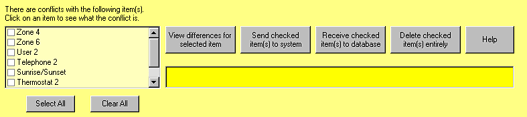
If differences between the system and ElkRP are detected during connection, the Conflicts Window is displayed. It is a yellow window near the bottom of the screen. The Conflicts Window lists every item that has changed. Click on each item to see whether it was changed in the system or in the database. Use the buttons inside the window to send or receive each item as appropriate to resolve each conflict.
This feature is enabled by default after installation. To turn this feature off, click the Setup menu, choose Options, then click on the Connections tab. For added security, you can also enable ElkRP to check for conflicts again before disconnecting. To enable this feature, check the appropriate box on the Connections tab.