


› Alarm Engine Support Forum › Panels Fall Offline
- This topic has 5 replies, 2 voices, and was last updated November 6, 2026 at 6:15 pm by Michael Burrell.
-
AuthorPosts
-
November 5, 2026 at 10:45 pm #11856Roberto Tokici
When updating panel firmware from 5.0.80 to 5.0.88 panels do not seem to come back when doing it remotely over the Elkconnect webpage.
Also going from 5.0.xx to 6.0.xx is not allowed, why is this not stated on the elk connect webpage. It just downloads and fails.
So now I have an offline panel and now I have to go to site, this has happened a few times already, the webpage remote updates do not seem to work properly.
Not sure if we need to be onsite for this system to update up to a certain version, but the problems on this systems are colossal.
November 5, 2026 at 11:06 pm #11857Michael BurrellRoberto,
I apologize that you’re experiencing these issues. Could you provide me with the last four digits of the MAC address from the most recent system where you encountered this problem? I would like to review the logs to see if we can gain any additional information from it.
You’re absolutely correct that there should be a prompt indicating the update path requirement. I’ll have that information added to the update messages.
Any E27 Control firmware version higher than 0.5.65 supports remote updates, so I’m very interested in understanding what you’re experiencing. I’ll have our QA team investigate this further tomorrow.
Thank you for bringing these issues to our attention.
November 5, 2026 at 11:09 pm #11858Roberto Tokici3A1C
The app indicates the alarm path. went form 5.80 to 5.88 then to 6.12 and then disappeared.
November 5, 2026 at 11:10 pm #11859Roberto TokiciCould not recall if I had to go to 6.2 then 6.12
November 5, 2026 at 11:31 pm #11860Michael BurrellThanks for the info, we will pull the logs in the morning.
The path is 5.88 and below have to be updated to the 6.2 before moving to a higher version. Once you have 6.2 or higher, there are no additional step requirements. If you attempt to update a system from 5.xx to 6.4 or higher before updating to 6.2 it will disregard the update and resume the prior firmware. The mobile apps will not allow you to update to a version that is not allowed, the web will have this feature as well.
November 6, 2026 at 6:15 pm #11864Michael BurrellRoberto,
I worked with Engineering and we reviewed the logs for the MAC 3A1C. We did not see any issues or anything that stood out as an issue. We saw it was online yesterday as of 9:33pm Eastern time. It lasted connected with 0.5.88 firmware. That leads us to believe that it updated to the 5.88 from the 5.80, but now it is not online. Why it is not online, we are unable to determine based on the information we have access to. If you are able to gather more information, we would like to know what you find.
My recommendation is if you are updating a system that is 0.5.65 or newer firmware. But not yet 0.6.2, go ahead and update to 0.6.2. No need to update from 0.5.80 to 0.5.88 etc.
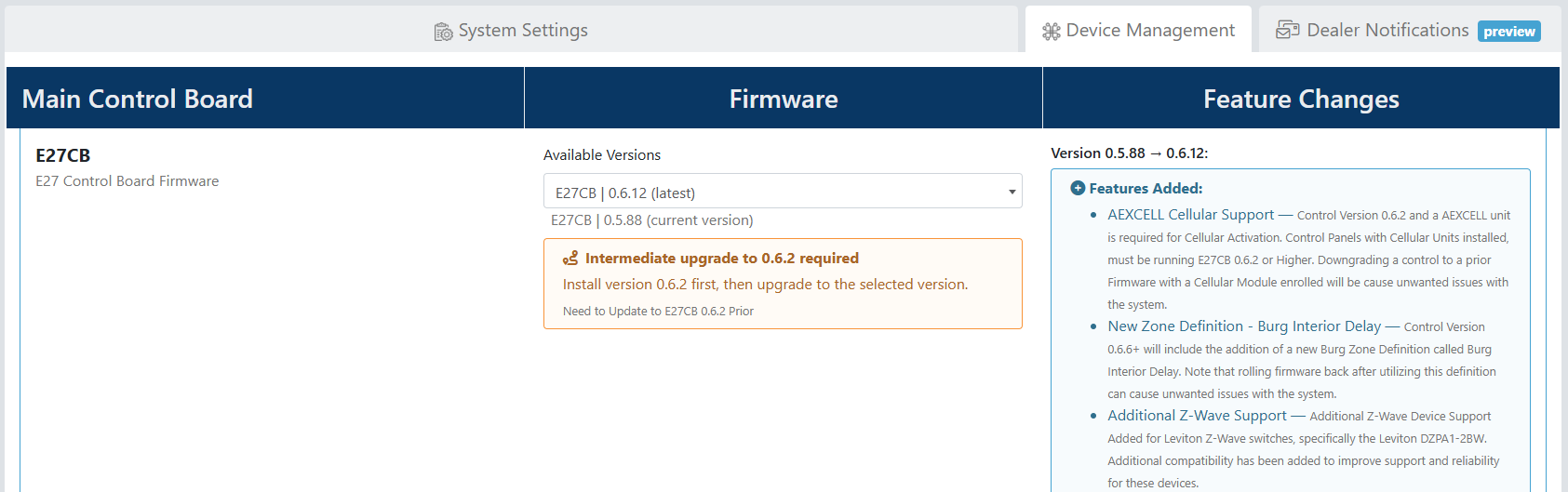
I did work with the web team today and implemented to process that will prevent updating when it is not supported. For example this is my test system below and I trying to go from 0.5.88 to the latest firmware which is 0.6.12. As you can see, it is not allowing me to do this and indicating that I need to update to 0.6.2 prior. This process is implemented and live on the web portal.
Again, I apologize for the issues you experienced and please feel free to reach out with additional information or feedback.
Thanks again
-
AuthorPosts
- You must be logged in to reply to this topic.