


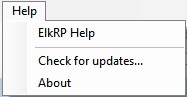
The Help menu has three commands:
ElkRP Help
Displays the online ElkRP Help. You can browse it to find a topic or use the search option to find topics.
Check for Updates
Displays a list of firmware update files that are available for download. Select the desired file(s) and click download to save the file(s) to your computer. Files are saved in the location specified for updates in the Setup -> Options menu.
About
Displays ElkRP’s version and contact information for Elk Products.