


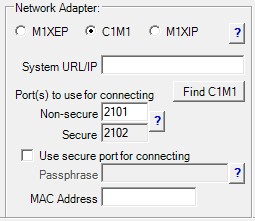
Select this option when using the C1M1 Dual Path Alarm Communicator to connect the M1 to the local network (LAN).
System URL/IP
This field specifies the address ElkRP uses to connect to the C1M1. The field may contain an IP address or a URL.
- Local connection via IP: Enter the IP address assigned to the C1M1 on the local network.
Find C1M1
Click this button to display the Find C1M1s screen and scan the local network for C1M1 units. Any C1M1 found on the network will be listed by MAC and IP address. Click the desired C1M1 and click Use Selected to copy the IP address, port, and MAC address info for that unit to the Network Adapter section.
Non-Secure Port
Enter the non-secure port number assigned to the C1M1. The default non-secure port is 2101. The C1M1 Config Utility is required to change this port number.
Secure Port
The secure port is automatically assigned a value of one greater than the non-secure port. (secure port = non-secure port + 1)
Use secure port for connecting
Check this box when connecting to the C1M1 using the secure port. Use of the secure port requires a passphrase, which is configured in the C1M1 through the C1M1 Config Utility. Enter the passphrase in the Passphrase field.
MAC Address
The MAC address of the C1M1 is required when connecting via C1M1 Proxy Connect. Enter the C1M1 MAC address printed on the label on the side of the C1M1 unit.