


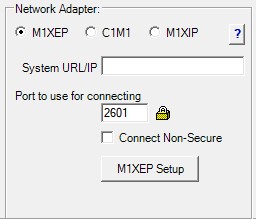
Select this option when using the M1XEP Ethernet Interface to connect the M1 to the local network (LAN).
System URL/IP
This field specifies the address ElkRP uses to connect to the M1XEP. The field may contain an IP address or a URL.
- Local connection via IP: Enter the IP address assigned to the M1XEP on the local network.
- Remote connection via IP: Enter the public IP address of the network to which the M1XEP is connected. This type of connection requires port forwarding to allow access to the M1XEP from outside the network.
- Remote connection via URL: Enter the URL assigned to the network to which the M1XEP is connected. The URL is typically provided through a Dynamic DNS (DDNS) service. This type of connection requires port forwarding to allow access to the M1XEP from outside the network.
Port
Enter the port number assigned to the M1XEP. This may be the secure port or the non-secure port, if enabled. The default secure port is 2601. The default non-secure port is 2101.
Connect Non-Secure
Check this box when connecting to the M1XEP using the non-secure port.
M1XEP Setup
Displays the M1XEP Setup screen, which contains tabs for configuring the various M1XEP features. Refer to the M1XEP Installation and Programming manual for details.