


Your organization may require increased security by controlling who can and cannot use ElkRP. If so, your system administrator should enable Multi-operator Access and assign the operators a log on name and password. You can further restrict what each individual operator may do with ElkRP by checking certain options.
To disable Multi-operator Access, clear the checkbox. Anyone may then use ElkRP without restriction. Check the box to enable it. When enabled, you may add, change, or remove operators. To add an operator, click Add. To change or remove an operator, click on the operator’s name, then click Change or Remove. When an operator is added or changed, a second window appears allowing you to enter the operator’s name and password. On this window, you can also select what that operator may or may not do in ElkRP.
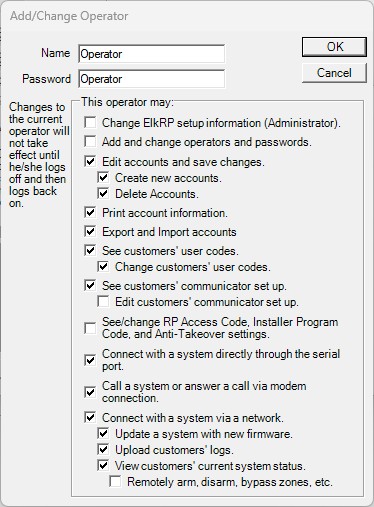
The name and password are limited to thirty characters each, and may consist of letters, digits, and punctuation marks.
Place a check in the box beside each action you want to allow the operator to perform. Whatever you select affects only that operator. Other operators must be configured separately. The options chosen for each operator apply across all accounts. Indented options are available only if the nearest un-indented option above it is checked.