


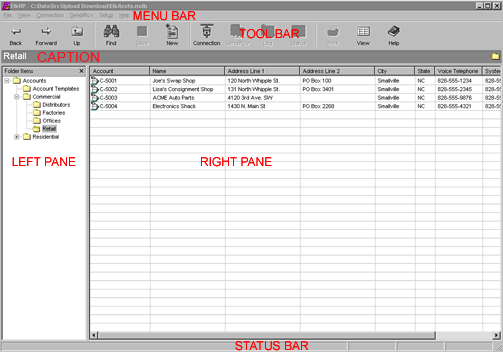
The left pane has two functions. Initially, it displays a list of all accounts in the Accounts Database. If the accounts are assigned to folder, it displays those folders in a tree view. After opening an account, the left pane displays all the programmable items for the account. These too are listed in a tree view.
The right pane lists details for items displayed in the left pane. When displaying accounts, the right pane lists account summaries. After opening an account, the right pane shows details for items selected in the left pane. If an item heading is selected, the right pane lists the details for all items under that heading. If a single item is selected in the left pane, the right pane displays the details for it and allows the operator to edit them.
The tool bar provides quick access to often used menu commands. The caption bar displays the account opened and the item being edited. The status bar displays tips, system model, connection status, and modified status of the account. The tool bar, caption bar, and status bar may be shown or hidden by selecting them in the View menu.