ElkRP Help

File Menu Overview

This menu allows you to find, open, and create new accounts. The print sub-menu allows you to print a variety of reports. You can also select a different accounts database from this menu and synchronize two different databases. If Multi-operator Access is enabled, the Exit ElkRP command will appear on the Operator menu instead of this menu.
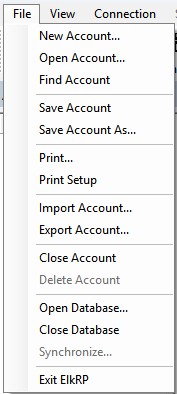
 

For help on each sub-menu command, click on one of the following:

File Menu: New Account

File Menu: Open Account

File Menu: Find Account

File Menu: Save Account

File Menu: Save Account As

File Menu: Print

File Menu: Print Setup

File Menu: Import Account

File Menu: Export Account

File Menu: Close Account

File Menu: Delete Account

File Menu: Open Database

File Menu: Close Database

File Menu: Synchronize

File Menu: Exit ElkRP

Scroll to Top