


This menu is enabled only when an account is open. Use this menu to connect to or disconnect from a system. You may connect directly through your computer’s serial port, modem, or a network. This menu also allows you to put ElkRP in an unattended auto-answer mode, to automatically answer modem calls coming in from systems.
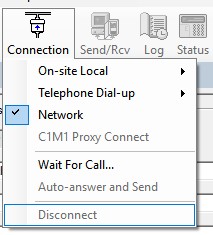
For help on each sub-menu command, click on one of the following:
Connection Menu: Telephone Dial-up
Connection Menu: C1M1 Proxy Connect
Connection Menu: Wait for Call
Connection Menu: Auto-answer and Send