


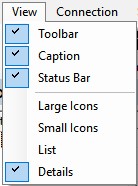
This menu allows you to configure various display options. You can show or hide the tool bar, caption, and status bar. It lets you select whether to view accounts and programmable items as large or small icons, in a list, or with details. Whatever settings you choose are remembered when you exit ElkRP, and are used the next time ElkRP is started.
For help on each sub-menu command, click on one of the following: