


The Operator menu only appears when Multi-operator Access is enabled. The system administrator may enable it in the Operator section of the Setup menu. Operators log on and off through this menu. If Multi-operator Access is not enabled, this menu will not be visible.
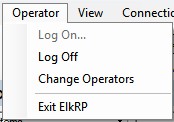
For help on each sub-menu command, click on one of the following: