


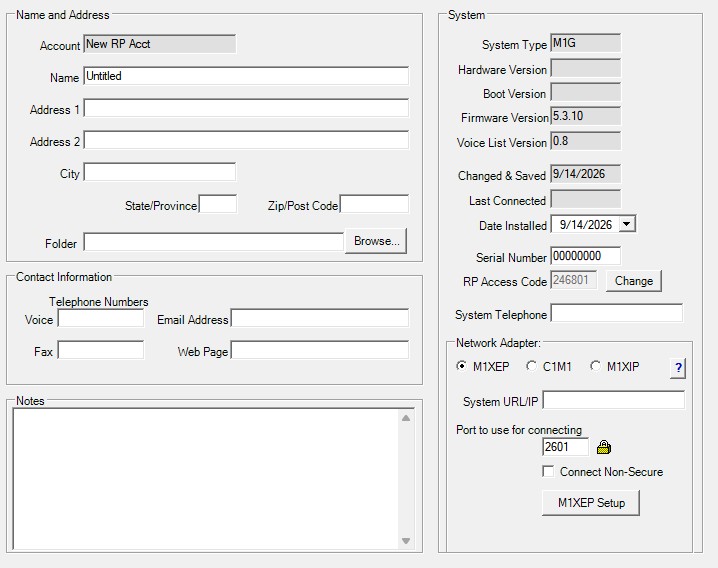
In the Name and Address frame, enter all the customer’s information that is known. In the Folder box, enter the folders and sub-folders (if any) to assign this account to. If the folder already exists, select it by clicking the Browse button.
In the Contact Information frame, enter the customer’s contact information if known. This information is not required by ElkRP, but it is useful when searching for an account and for contacting the customer.
In the System frame, some boxes are filled in automatically by ElkRP. Others, you must fill in. Some items in this frame are required in order to connect to the system. The following list describes each field in this frame:
• System Type: The system’s model number. Selected in the New Account dialog when the account was created. Cannot be changed.
• Hardware Version: The main unit’s hardware version. Updated automatically by ElkRP after connecting to the system.
• Boot Version: The main unit’s boot loader version. Updated automatically by ElkRP after connecting to the system. The boot loader is the underlying operating system of the main unit. It initializes the system on power-up and performs basic operations for the software.
• Firmware Version: The main unit’s firmware version. Updated automatically by ElkRP after connecting to the system.
• Voice List Version: If the system has a voice board, this is the version of the list of words contained on that board. Updated automatically by ElkRP after connecting to the system.
• Changed & Saved: The date the account was last modified and saved.
• Last Connected: The date ElkRP last connected to the account.
• Date Installed: Date the system was installed. Entered by the operator. Not required by ElkRP, it exists only for the operator’s reference.
• Serial Number: The unique serial number programmed in the main unit at the factory. Every system in a model family has a unique serial number. Entered in the New Account dialog when the account was created. ElkRP will not connect if the number entered does not match the system’s serial number.
• RP Access Code: A unique code that prevents takeover of the account. Entered by the operator when creating a new account.
• System Telephone: The telephone number of the system. Required if ElkRP is to call the system and connect via modem. Entered by the operator.
• Network Adapter selector: Allows operator to choose the installed network adapter type. Choices are M1XEP, C1M1, and M1XIP. Select the adapter type that matches the installed adapter. Options available in this section will change based on selected adapter.
• System URL/IP Address: Required if ElkRP is to connect to the system through a network or through the internet. Entered by the operator. Type in the network interface module’s assigned IP address using the xxx.xxx.xxx.xxx (IP4) format.
• Port: The port used by the network interface module. Entered by the operator. Type in the number assigned to the module.
In the Notes frame, there is a large box with scroll bars. Enter any pertinent notes or reminders here. You could use this area for directions to the property where the system is installed, to list any special or unique circumstances about the installation, or any other information you need.